

/https%3A%2F%2Fassets.over-blog.com%2Ft%2Ftwentyeleven%2Fimages%2Fpine-cone.jpg "Latest Tech News, Mac News, Android Devices, Popular Smart Phones, Camera and Camcorders and Useful Tips and Guides")
How to edit MXF files in iMovie
Published on September 11 2014
“How to import MXF files to iMovie for editing? Is there a good way to import Sony MXF files into iMovie 11. iMovie 11 won’t import them. In the import dialog box the files are grayed out. What can I do?” —— Answers Yahoo
MXF files can be edited in many video editing program such as Adobe After Effects, Adobe Premiere Pro, Apple Final Cut Pro. However, MXF files are not supported by iMovie. If you need to edit MXF files in iMovie, the easiest way is to get a MXF to iMovie Converter.
Aiseesoft MXF Converter for Mac can help you fast and best convert Canon XF, Panasonic P2 and Sony XDCAM MXF files to AIC MOV for iMovie, FCE, Prores MOV for PFC. Besides, it can also convert MXF files to other popular files on Mac.
By converting MXF files to any video format you need, you can freely import MXF files to iMovie, FCP for editing, play MXF files on iPhone, iPad and other portable devices, upload to YouTube or burn to DVD etc.
Tips: If you need to convert and edit MXF files on Windows, you can turn to MXF Video Converter.
Step by step to convert MXF to iMovie
Step 1: Import MXF files
Click “Add Video” or directly drag and drop MXF files to Mac MXF Converter.

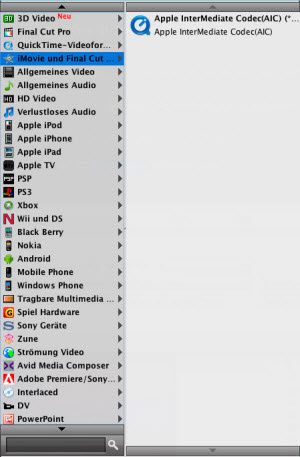
Step 2: Choose AIC MOV as output format
Click “Format” option, and choose “iMovie and Final Cut Express” -> “Apple InterMediate Codec (AIC)” from the dropdown list.
Step 3: Convert MXF to AIC MOV for iMovie
Click “Convert” to convert MXF to AIC MOV for iMovie.

Article Source: How to edit MXF files in iMoive