/https%3A%2F%2Fassets.over-blog.com%2Ft%2Ftwentyeleven%2Fimages%2Fpine-cone.jpg "Latest Tech News, Mac News, Android Devices, Popular Smart Phones, Camera and Camcorders and Useful Tips and Guides")
Fast and best convert Flash SWF files to HTML5
Published on October 21 2013
"My websites have a few flash swf animations. But they can't be played on some tablets or mobile devices. I can't use Google's Swiffy because my swf files are over 1mb. What can I use?" ---- Adobe
HTML5 is very rapidly becoming a standard. Developers want to use HTML5 which in return makes it all the more popular and the driving force for it to be here to stay is strong. Modern browsers all support HTML5 allowing developers to use all the new and exciting features it offers in order to create more dynamic end results. Besudes, it is also mobile friendly.
If you want to convert Flash SWF files to HTML5, you need to find a professional SWF to HTML5 Converter. However, you may find it difficult to find a proper program to convert SWF to HTML5.
Here, you can turn to SWF to HTML5 Movie Maker which can fast and best convert SWF files, SWF videos, SWF movies, SWF games, SWF animations, SWF flash banners to HTML5 videos so as to upload to website for enjoying on laptop, desktop, or portable devices using popular browsers, such as Internet Explorer, Firefox, Google Chrome, Apple Safari, or Opera.
Step by step to convert SWF to HTML5 with SWF to HTML5 Converter
Click “Open Local File” to import SWF files directly from your computer. SWF to HTML5 Converter enables to download flash ads from website. You can click “Download From Web” to import online SWF files.
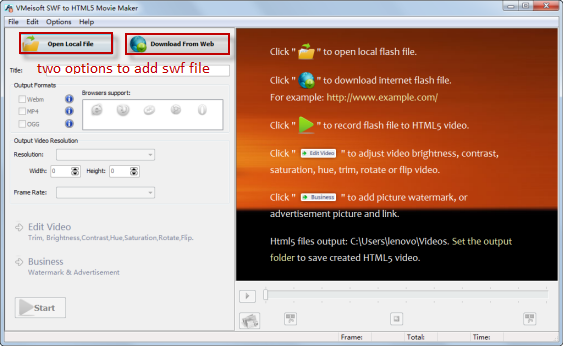
Select HTML5 Webm, MP4 or OGG as output format according to your needs.SWF to HTML5 Converter empowers you to change the output video resolution, frame rate, etc.
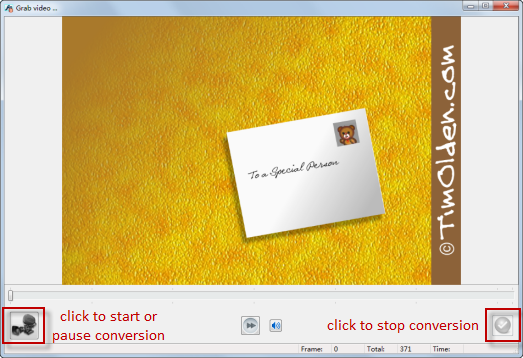
Click “Start” to go to the Grab window. Then start converting your SWF files to HTML5. After conversion, you will get SWF files in HTML5 format.