

/https%3A%2F%2Fassets.over-blog.com%2Ft%2Ftwentyeleven%2Fimages%2Fpine-cone.jpg "Latest Tech News, Mac News, Android Devices, Popular Smart Phones, Camera and Camcorders and Useful Tips and Guides")
How to convert SWF to MP4 on Mac and Windows
Published on September 4 2014
“How to convert SWF to MP4 on Mac? I’m going thru the endless list of I don’t know how many converters that say convert SWF to MP4 when all they do is convert FLV to MP4. Can someone point me to a SWF to MP4 converter so I can convert a video to play on iPad?” —— Apple Discussion
Yes, there are many programs online that promised to convert SWF to MP4 which only end up with converting FLV to MP4. Therefore, it is very hard to find a reliable SWF to MP4 Converter.
Don’t worry, you can always turn to Doremisoft SWF Converter for Mac which can fast and best convert SWF to MP4 on Mac so that you can playback on iPhone/iPad/iPod, Samsung and other Android phones and tablets.
Besides, you can can also use Mac SWF Converter to convert SWF to other video formats such as AVI, WMV, MPG, MPG, MOV, MKV, FLV, 3GP, RMVB, VOB, ASF etc on Mac.
Tips: If you need to convert SWF to MP4 on Windows, you can turn to SWF Video Converter.
Step by step to convert SWF to MP4 on Mac
Step 1: Load SWF files
After downloading and installing Mac SWF Converter. Click “Select File” to add SWF files to the program.
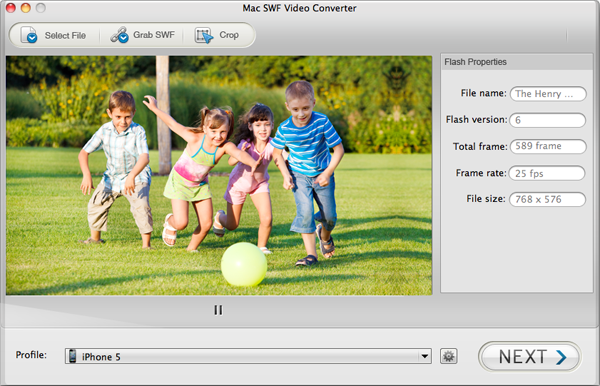
Tips: If you want to convert SWF videos from online websites, grab SWF files online to convert. Paste the video URL, click “Grab” and the software automatically grab all the SWF videos, and then choose to convert or download these videos on Mac.
Step 2: Select MP4 as output format
Click the drop-down list of “Profile” and select MP4 as output format.
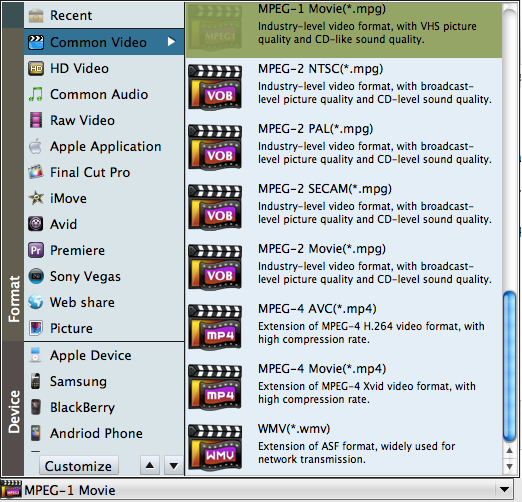
Step 3: Convert SWF to MP4 on Mac
Press “Next” to go to the conversion interface. Then click “Start” to start converting SWF to MP4.on Mac.

Article Source; How to convert SWF to MP4 on Mac and Windows